
Product Updates
3 mins
December 17, 2025
We’re excited to announce a new feature in the Datalab API: Form Filling. This feature lets you programmatically fill PDF forms using AI-powered field matching, whether the PDF has native form fields or not.
Form filling takes your data and intelligently maps it to form fields in a PDF. You provide a set of key-value pairs describing your data, and the API figures out which fields in the form they should go into.
This works for:
The key insight is that you don’t need to know the exact field names in the PDF. The API uses semantic matching to figure out that your last_name field should go into the form’s “Last Name (Family Name)” field.
Anyone who has dealt with form automation knows the pain:
topmostSubform[0].CopyA[0].LeftColumn[0].f1_2[0] instead of something readable like “payer_name”Our form filling API handles all of this. You provide human-readable field descriptions, and we handle the mapping.
The quickest way to get started is with our SDK:
pip install datalab-python-sdk
export DATALAB_API_KEY="your_api_key_here"
from datalab_sdk import DatalabClient
from datalab_sdk.models import FormFillingOptions

client = DatalabClient()

# Your data with descriptions
field_data = {
    "last_name": {"value": "Smith", "description": "Employee last name"},
    "first_name": {"value": "John", "description": "Employee first name"},
    "ssn": {"value": "123-45-6789", "description": "Social Security Number"},
    "date_of_birth": {"value": "01/15/1990", "description": "Date of birth"},
    "address": {"value": "123 Main Street", "description": "Street address"},
    "city": {"value": "San Francisco", "description": "City"},
    "state": {"value": "CA", "description": "State"},
    "zip": {"value": "94102", "description": "ZIP code"},
}

options = FormFillingOptions(
    field_data=field_data,
    context="New employee onboarding",
    confidence_threshold=0.5,
)

result = client.fill("i-9.pdf", options=options)
result.save_output("i-9_filled.pdf")

print(f"Filled{len(result.fields_filled)} fields!")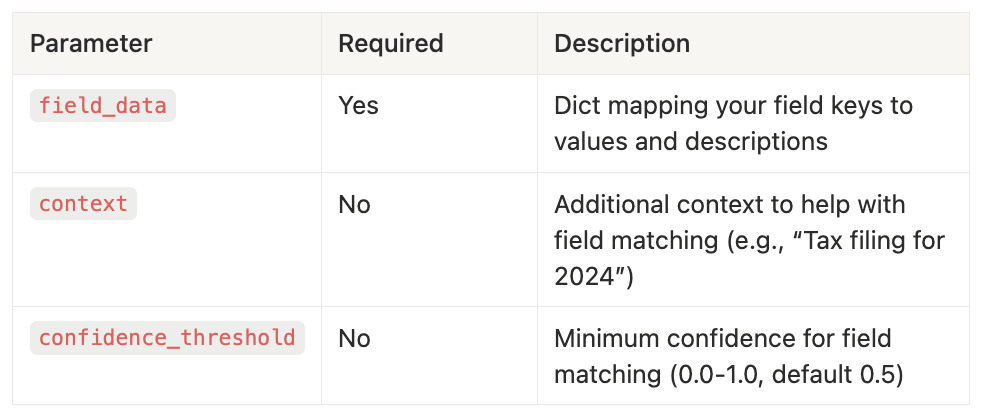
Each field in field_data should have:
value: The value to fill indescription: An optional human-readable description of what this field represents - you can leave it blank if not neededfield_data = {
"your_field_key": {
"value": "The actual value to fill",
"description": "What this field represents"
}
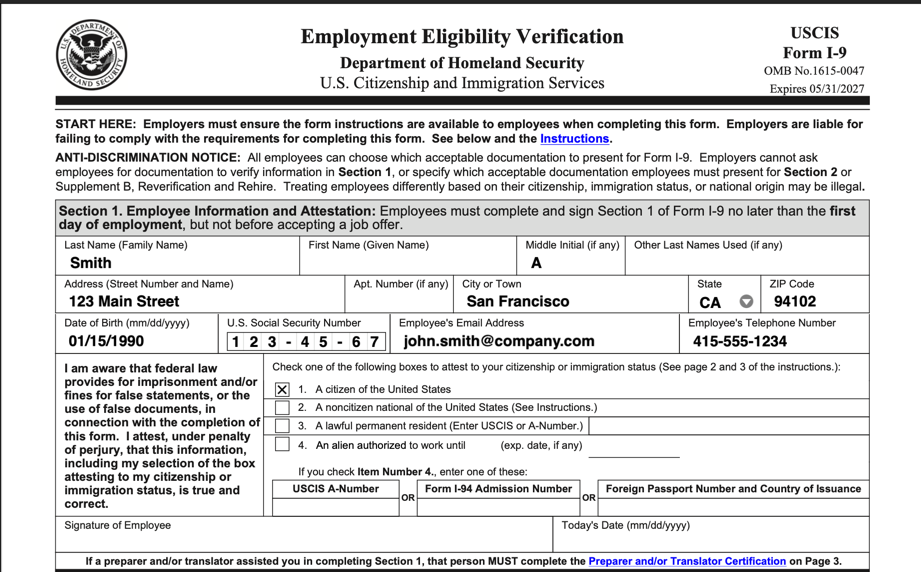
}The I-9 is required for every new employee in the US. Here’s how to fill it:
from datalab_sdk import DatalabClient
from datalab_sdk.models import FormFillingOptions

client = DatalabClient()

i9_fields = {
    "last_name": {"value": "Smith", "description": "Employee last name"},
    "first_name": {"value": "John", "description": "Employee first name"},
    "middle_initial": {"value": "A", "description": "Middle initial"},
    "address": {"value": "123 Main Street", "description": "Street address"},
    "city": {"value": "San Francisco", "description": "City or town"},
    "state": {"value": "CA", "description": "State"},
    "zip": {"value": "94102", "description": "ZIP code"},
    "date_of_birth": {"value": "01/15/1990", "description": "Date of birth"},
    "ssn": {"value": "123-45-6789", "description": "Social Security Number"},
    "email": {"value": "john.smith@company.com", "description": "Email address"},
    "phone": {"value": "415-555-1234", "description": "Phone number"},
    "immigration_status": {"value": "Citizen", "description": "Status of immigration"}
}

options = FormFillingOptions(
    field_data=i9_fields,
    context="New employee onboarding for software engineer position",
)

result = client.fill("i-9.pdf", options=options)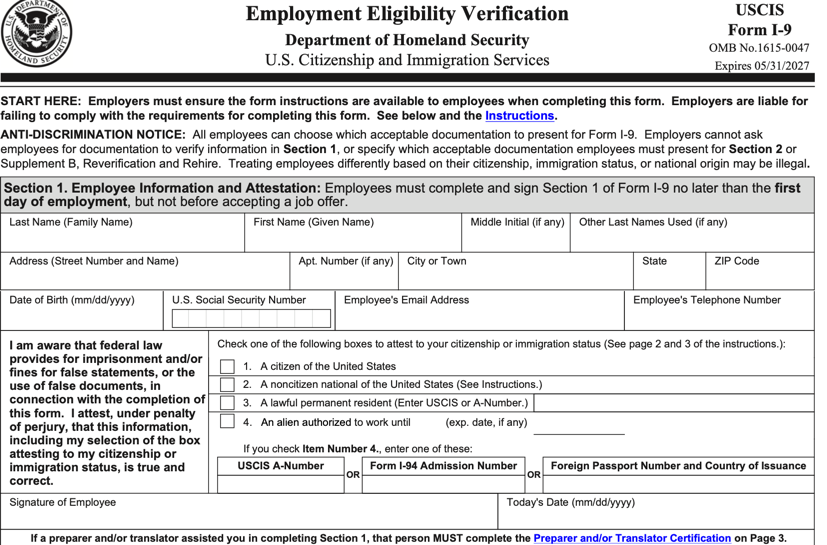
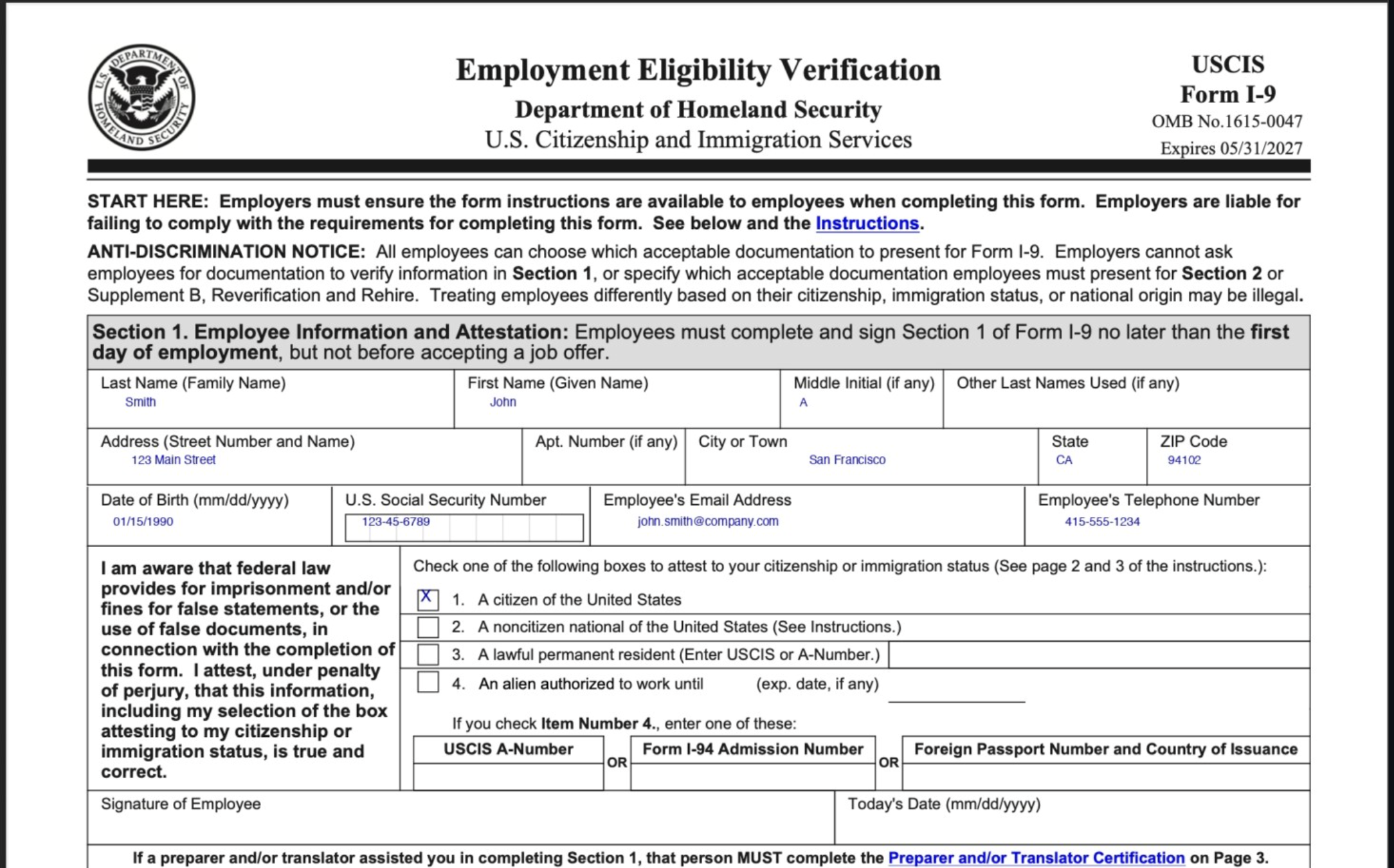
Datalab can also fill in form fields in images, or PDFs without native forms fields. This is how the same form looks if we remove the native fields.
context parameter helps disambiguate fields. If you’re filling a tax form for 2024, include that in the context.fields_filled so you can verify what was filled.We’re excited to see what you build with form filling. Whether you’re automating HR onboarding, tax preparation, government applications, or any other form-heavy workflow, this feature can save you hours of manual work.


Made with love in Manhattan, NY
© Endless Labs, Inc. All rights reserved.
